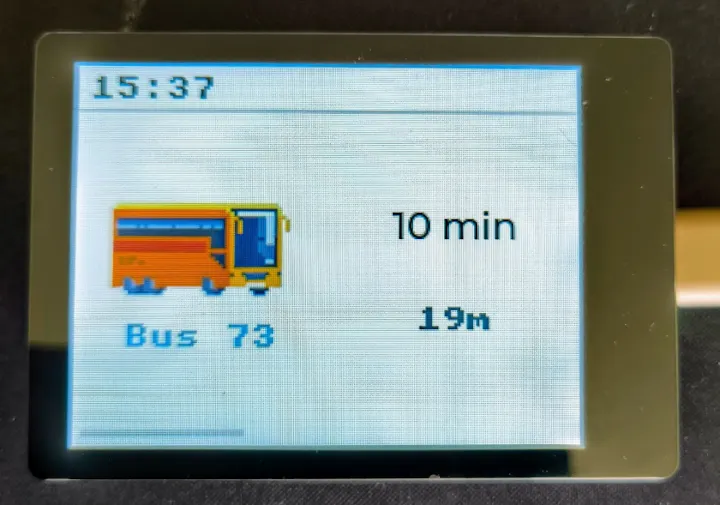
5 - ESP32 - Public transport monitor
OK so this is a fun one. Basically I wanted to use the ESP32 to show when the next bus/tram near the stops where I live will arrive. This required answers for several questions.
The Questions
- From where do I get the data? I tried going through some third party/wrapper APIs but didn’t have much luck. Ended up using Sofia Transit’s public GTFS data. For those of you who don’t know what GTFS data is (I didn’t before I did this) - there are two main types: static (list of stops and routes) and streaming (constantly streaming binary data).
- How do I use the data? Since I wasn’t sure what the data really was, I vibecoded a quick Python script to test it out and confirm what I had was what I needed. I ended up identifying the transportation lines and stops that I was interested in.
The Process
Once that was done, it was an easy process:
- Give Claude (or any other AI) the context of what we’ll be doing. I broke it down into two main stages - getting the data and then doing the UI.
- Provide the necessary data - controller specs, the Python script that I had created, the mapping that I wanted to use, etc.
- Code it and run it on the device. The goal here was to make sure that data gets extracted.
- Once I confirmed data was extracted, it was a matter of pinning down the UI (that took a few tries).
What really helped and what I learned
Here are a few things that I learned:
- Setting up the WiFi was a bit of a pain so it required some back and forth.
- Don’t expect good UI on C++ right off the bat. It required some tweaking and back and forth to figure out how to represent proper pixel style images.
- One thing that was super useful was Arduino Cli which is basically the commandline version of the IDE. Why was it helpful? Since you have AI doing it - you can let it compile the code and upload to the device directly and debug on its own via the Serial output.
One thing that I do hope I’ve managed to achieve by updating my “Claude brain” is those hard lessons so we don’t repeat the mistakes that were made.
What I learned: +1 on my ESP skills. It was really fun to understand how transportation data worked and how you can use it.
How to replicate: Well, you need to answer the two questions yourself. I’ve also uploaded the generated code (you need to set some parameters yourself) on github so you can use it as a starting point (have in mind that it would differ based on your ESP model + data that you would be using).